[Applet] 자바 애플릿(Java Applet)으로 지진 강도 시각화하기 [Programming Assignment for Module 3]

2023. 8. 24. 12:53·◎ Java/Applet🧳
728x90
반응형

- 자바 애플릿(Java Applet)으로 지진 강도 시각화하기

1. RSS 피드로 받은 각 지진 위치 마커로 표시하는 코드 추가

- EarthquakeCityMap.java

public void setup() {
    size(950, 600, OPENGL);

    if (offline) {
        map = new UnfoldingMap(this, 200, 50, 700, 500, new MBTilesMapProvider(mbTilesString));
        earthquakesURL = "2.5_week.atom"; 	// Same feed, saved Aug 7, 2015, for working offline
    }
    else {
        map = new UnfoldingMap(this, 200, 50, 700, 500, new Google.GoogleMapProvider());
        // IF YOU WANT TO TEST WITH A LOCAL FILE, uncomment the next line
        //earthquakesURL = "2.5_week.atom";
    }

    map.zoomToLevel(2);
    MapUtils.createDefaultEventDispatcher(this, map);	

    // The List you will populate with new SimplePointMarkers
    List<Marker> markers = new ArrayList<Marker>();

    //Use provided parser to collect properties for each earthquake
    //PointFeatures have a getLocation method
    List<PointFeature> earthquakes = ParseFeed.parseEarthquake(this, earthquakesURL);

    //TODO (Step 3): Add a loop here that calls createMarker (see below) 
    // to create a new SimplePointMarker for each PointFeature in 
    // earthquakes.  Then add each new SimplePointMarker to the 
    // List markers (so that it will be added to the map in the line below)
    for(PointFeature eq : earthquakes) {
        markers.add(createMarker(eq));
    }

    // Add the markers to the map so that they are displayed
    map.addMarkers(markers);
}
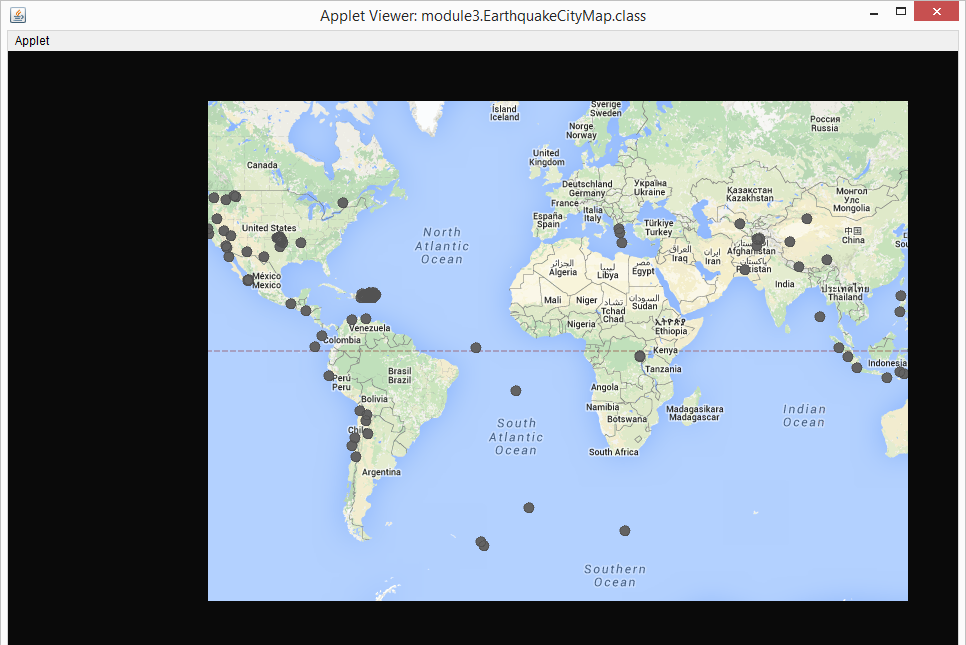
RSS 피드로 받은 각 지진 위치 마커로 표시


2. 지진 규모에 따라 각 마커의 스타일을 지정하는 코드 추가

  • 소규모 지진(규모 4.0 미만)은 파란색 마커로 표시되며 규모가 작습니다.
  • 가벼운 지진(4.0~4.9 사이)은 노란색 표시가 있고 크기는 중간입니다.
  • 보통 및 높은 규모의 지진(5.0 이상)은 빨간색 마커로 표시되며 규모가 가장 큽니다.

- EarthquakeCityMap.java

private SimplePointMarker createMarker(PointFeature feature) {
    // Create a new SimplePointMarker at the location given by the PointFeature
    SimplePointMarker marker = new SimplePointMarker(feature.getLocation());

    Object magObj = feature.getProperty("magnitude");
    float mag = Float.parseFloat(magObj.toString());

    // Here is an example of how to use Processing's color method to generate 
    // an int that represents the color yellow.  
    int yellow = color(255, 255, 0);

    int blue = color(0, 0, 255);
    int red = color(255, 0, 0);

    // TODO (Step 4): Add code below to style the marker's size and color 
    // according to the magnitude of the earthquake.  
    // Don't forget about the constants THRESHOLD_MODERATE and 
    // THRESHOLD_LIGHT, which are declared above.
    // Rather than comparing the magnitude to a number directly, compare 
    // the magnitude to these variables (and change their value in the code 
    // above if you want to change what you mean by "moderate" and "light")

    if(mag < THRESHOLD_LIGHT) {
        marker.setColor(blue);   // Minor earthquakes (less than magnitude 4.0)
        marker.setRadius(5);
    }
    else if(mag >= THRESHOLD_MODERATE) {
        marker.setColor(red);    // Moderate and higher earthquakes (5.0 and over)
        marker.setRadius(20);
    }
    else {
        marker.setColor(yellow); // Light earthquakes (between 4.0-4.9)
    }

    // Finally return the marker
    return marker;
}
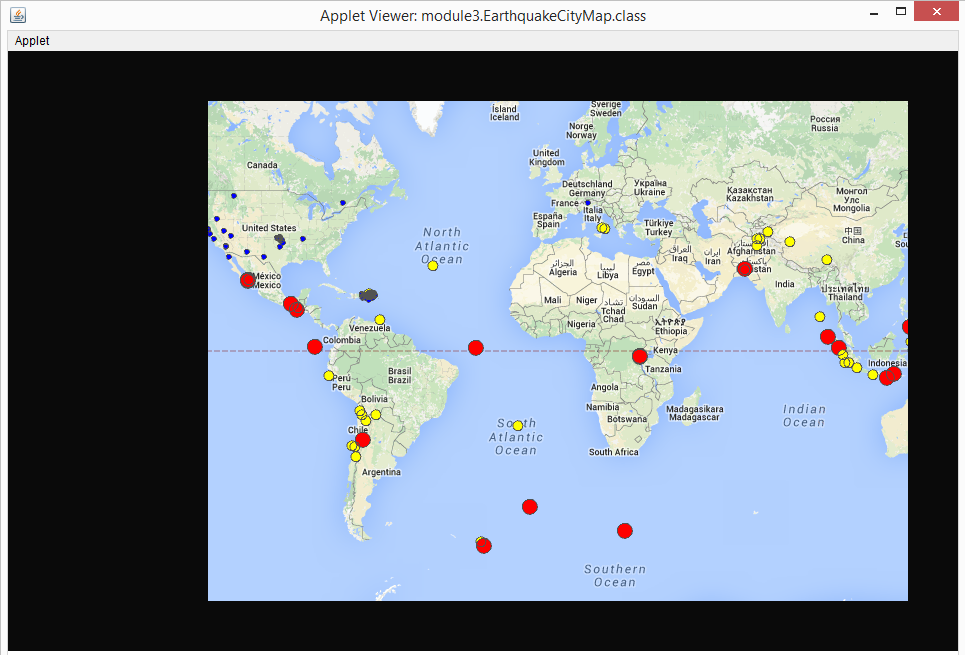
지진 규모에 따라 각 마커의 스타일을 지정하는 코드 추가


3. 지진 강도 설명하는 키를 그리고 지도 왼쪽에 표시

- EarthquakeCityMap.java

private void addKey() {
    // Remember you can use Processing's graphics methods here

    // white rectangle
    fill(color(255, 255, 255));
    rect(25, 50, 150, 250);

    // red circle
    fill(color(255, 0, 0));
    ellipse(50, 117, 20, 20);

    // yellow circle
    fill(color(255, 255, 0));
    ellipse(50, 157, 10, 10);

    // blue circle
    fill(color(0, 0, 255));
    ellipse(50, 197, 5, 5);

    // text
    fill(color(0, 0, 0));
    text("Earthquake Key", 45, 80);
    text("5.0+ Magnitude", 70, 120);
    text("4.0+ Magnitude", 70, 160);
    text("Below 4.0", 70, 200);
}
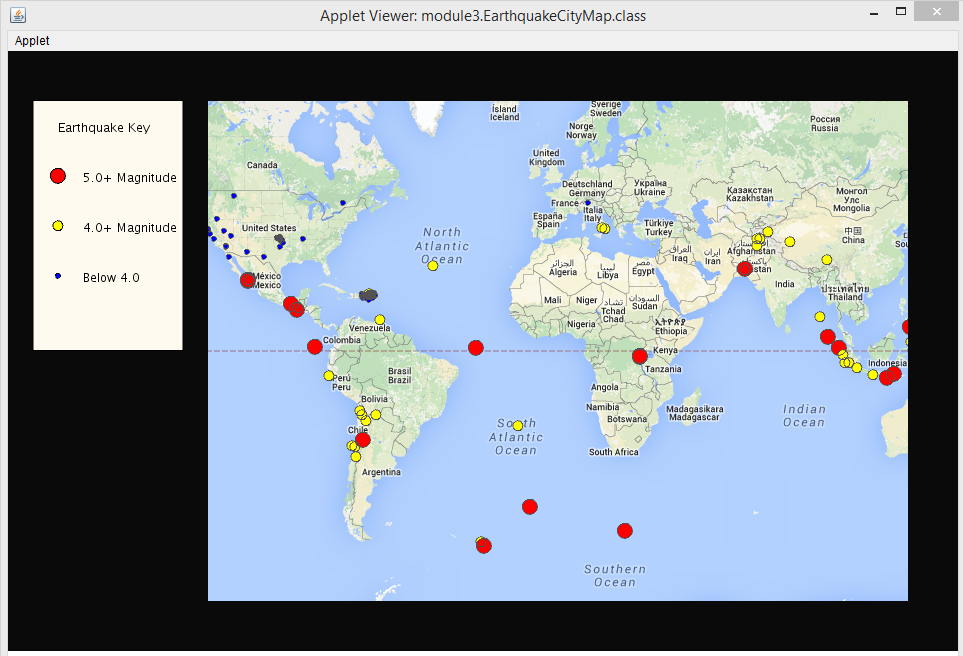
지진 강도 설명하는 키를 그리고 지도 왼쪽에 표시


728x90
반응형
'◎ Java/Applet🧳' 카테고리의 다른 글
  • [Applet] 자바 애플릿(Java Applet)에서 마우스 이벤트 구현하기 [Programming Assignment for Module 5]
  • [Applet] 자바 애플릿(Java Applet)으로 지진 종류 시각화하기 [Programming Assignment for Module 4]
  • [Applet] 자바 애플릿(Java Applet)으로 전세계 기대수명 시각화하기 [Bonus: Visualizing life expectancy]
  • [Applet] 자바 애플릿(Java Applet)으로 우리 동네 지도 표시하기 [Programming Assignment for Module 1]
예르미(yermi)
예르미(yermi)
끊임없이 제 자신을 계발하는 개발자입니다👨🏻‍💻
  • 예르미(yermi)
    예르미의 코딩노트
    예르미(yermi)
  • 전체
    오늘
    어제
    • 분류 전체보기 (1025) N
      • ◎ Java (133)
        • Java☕ (93)
        • JSP📋 (26)
        • Applet🧳 (6)
        • Interview👨🏻‍🏫 (8)
      • ◎ JavaScript (48)
        • JavaScript🦎 (25)
        • jQuery🌊 (8)
        • React🌐 (2)
        • Vue.js🔰 (6)
        • Node.js🫒 (3)
        • Google App Script🐑 (4)
      • ◎ HTML5+CSS3 (17)
        • HTML5📝 (8)
        • CSS3🎨 (9)
      • ──────────── (0)
      • ▣ Framework (67)
        • Spring🍃 (36)
        • Spring Boot🍀 (12)
        • Bootstrap💜 (3)
        • Selenium🌕 (6)
        • MyBatis🐣 (10)
      • ▣ Tools (47)
        • API🎯 (18)
        • Library🎲 (15)
        • JitPack🚀 (3)
        • Jenkins👨🏻 (7)
        • Thymeleaf🌿 (4)
      • ▣ Server (30)
        • Apache Tomcat🐱 (14)
        • Apache HTTP Server🛡️ (1)
        • Nginx🧶 (7)
        • OracleXE💿 (4)
        • VisualSVN📡 (4)
      • ▣ Infra & DevOps (20) N
        • LGTM Stack🔭 (5)
        • Kafka🐦‍🔥 (0)
        • Kubernetes🚢 (9) N
        • KubeCon Japan 2026⚓ (6)
      • ▣ OS : 운영체제 (18)
        • cmd : 명령프롬프트💻 (10)
        • Linux🐧 (8)
      • ▣ SQL : Database (56)
        • Oracle SQL🏮 (26)
        • PL SQL💾 (9)
        • MySQL🐬 (6)
        • MariaDB🦦 (6)
        • H2 Database🔠 (3)
        • SQL 실전문제🐌 (6)
      • ────────── (0)
      • ◈ Human Project (86)
        • Mini : Library Service📚 (15)
        • 화면 설계 [HTML]🐯 (10)
        • 서버 프로그램 구현🦁 (15)
        • Team : 여수어때🛫 (19)
        • Custom : Student🏫 (9)
        • Custom : Board📖 (18)
      • ◈ Yermi Project (49)
        • 조사모아(Josa-moa)📬 (5)
        • Riddle-Game🧩 (6)
        • 맛있을 지도🍚 (2)
        • 어디 가! 박대리!🙋🏻‍♂️ (5)
        • 조크베어🐻‍❄️ (4)
        • Looks Like Thirty🦉 (2)
        • Toy Project💎 (12)
        • 오픈소스 파헤치기🪐 (5)
        • 오늘가챠🃏 (8)
      • ◈ Refactoring (15)
        • Mini : Library Service📚 (8)
        • 서버 프로그램 구현🦁 (1)
        • Team : 여수어때🛫 (0)
        • 쿼리 튜닝일지🔧 (6)
      • ◈ Coding Test (80)
        • 백준(BOJ)👨🏻‍💻 (71)
        • 프로그래머스😎 (2)
        • 코드트리🌳 (7)
      • ◈ Study (129)
        • 기초튼튼 개발지식🥔 (25)
        • HTTP 웹 지식💡 (4)
        • 클린코드(Clean Code)🩺 (1)
        • 디자인패턴(GoF)🥞 (12)
        • 알고리즘(Algorithm)🎡 (14)
        • 다이어그램(Diagram)📈 (4)
        • 파이썬(Python)🐍 (16)
        • 에러노트(Error Note)🧱 (34)
        • 웹 보안(Web Security)🔐 (11)
        • 인공지능 AI🛸 (8)
      • ◈ 공부모임 (57)
        • 혼공학습단⏰ (18)
        • 코드트리 챌린지👊🏻 (2)
        • 개발도서 100독👟 (8)
        • 나는 리뷰어다🌾 (17)
        • 국가기술자격 서포터즈🌻 (12)
      • ◈ 자격증 공부 (48)
        • 정보처리기사🔱 (16)
        • 정보처리산업기사🔅 (9)
        • 정보보안기사⚜️ (11)
        • 컴퓨터활용능력 1급📼 (12)
      • ─────────── (0)
      • ◐ 기타 (124)
        • 알아두면 좋은 팁(tip)✨ (46)
        • 개발자의 일상🎈 (55)
        • 개발도서 서평🔍 (10)
        • 개발관련 세미나🎤 (2)
        • 블로그 꾸미기🎀 (9)
        • 사도신경 프로젝트🎚️ (2)
  • 인기 글

  • 최근 댓글

  • 반응형
    250x250
  • 태그

    Database
    SQL
    Java
    코딩
    CSS
    코딩 테스트
    일상
    jsp
    javascript
    백준 티어
    백준
    프로그래밍
    Error Note
    BOJ
    자바스크립트
    spring boot
    Project
    꿀팁
    Oracle
    spring
  • hELLO· Designed By정상우.v4.10.3
예르미(yermi)
[Applet] 자바 애플릿(Java Applet)으로 지진 강도 시각화하기 [Programming Assignment for Module 3]
상단으로

티스토리툴바