728x90
반응형
[API] 텔레그램 API 이용해서 메시지 전송하기 [Telegram Bot 생성 및 메시지 전송]
- 텔레그램 API 이용해서 메시지 전송하기오늘은 텔레그램 Bot을 활용하여 채팅방에 메시지를 보내보려 한다.채팅방에 메시지를 보낼 봇 생성부터 시작해보겠다.1. 텔레그램 봇 생성하기채팅
yermi.tistory.com
- 텔레그램 API 이용해서 채팅방에 이미지 전송하기
지난 번에는 봇 생성, 채팅방 ID 조회, 채팅방에 메시지 보내기 등을 해보았다.
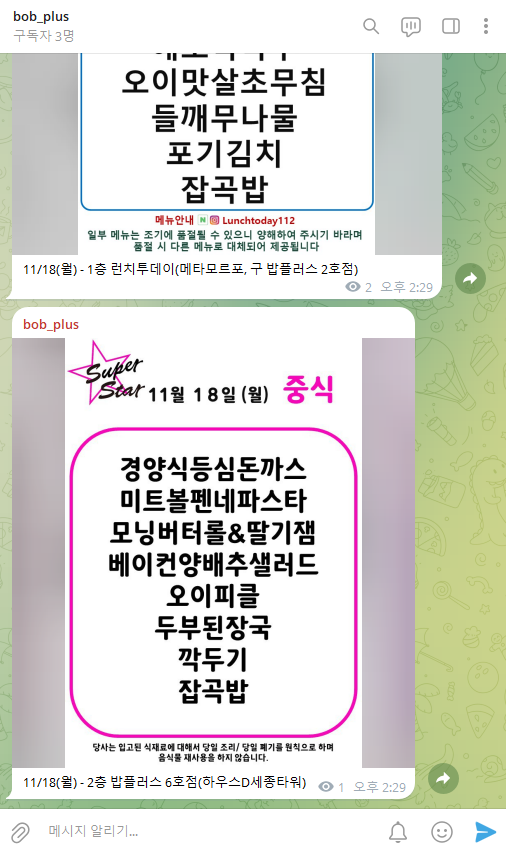
이번에는 조금 더 나아가 채팅방에 이미지를 보내보려 한다.
- 이미지 URL을 스크래핑한 경우
OkHttpClient client = new OkHttpClient();

String fileContents = "사진의 URL";
String text = "캡션 내용";

RequestBody requestBody = new MultipartBody.Builder()
		.setType(MultipartBody.FORM)
		.addFormDataPart("chat_id", "-1002163264103")
		.addFormDataPart("photo", fileContents)
		.addFormDataPart("caption", text)
		.build();

Request request = new Request.Builder()
		.url("https://api.telegram.org/bot7877333542:AAHdoPZ8uiSP2XA0qZUJMIhhLaa_EpQTTiA/sendPhoto")
		.post(requestBody)
		.build();

Response response = client.newCall(request).execute();

if (response.isSuccessful()) {
	System.out.println("Image sent successfully.");
} else {
	System.out.println("Error sending image: " + response.message());
}
- 서버에 저장되어 있는 파일을 보내려는 경우
OkHttpClient client = new OkHttpClient();

String fileContents = "파일 경로";
String text = "캡션 내용";

RequestBody requestBody = new MultipartBody.Builder()
		.setType(MultipartBody.FORM)
		.addFormDataPart("chat_id", "-1002163264103")
		.addFormDataPart(
			"photo",				// form 필드 이름
			new File(fileContents).getName(),	// 업로드될 파일 이름
			RequestBody.create(
				new File(fileContents),		// 실제 파일 객체
				MediaType.parse("image/jpeg")	// MIME 타입 (필요에 따라 변경 가능)
			)
		)
		.addFormDataPart("caption", text)
		.build();

Request request = new Request.Builder()
		.url("https://api.telegram.org/bot7877333542:AAHdoPZ8uiSP2XA0qZUJMIhhLaa_EpQTTiA/sendPhoto")
		.post(requestBody)
		.build();

Response response = client.newCall(request).execute();

if (response.isSuccessful()) {
	System.out.println("Image sent successfully.");
} else {
	System.out.println("Error sending image: " + response.message());
}
728x90
반응형